

If you run a customer, member, supplier or contractor portal on Power Pages, its security model is about to change in a way you'll want to know about. Microsoft is moving permission checks for portal users out of Power Pages and into Dataverse itself.
Preview flag: Microsoft's documentation calls this enhanced authorization and lists it as a preview feature, noting that preview features "aren't meant for production use". The roadmap item shows the preview from July 2026, with general availability planned for November 2026 and a status of In development as at mid-October.
How it works today
In the standard model, Power Pages pulls data from Dataverse using a Power Pages application user with elevated privileges, then checks table and record permissions itself. Microsoft's enhanced authorization documentation is refreshingly candid about the downsides. All those extra round trips can slow things down. It also makes things less transparent, because customers can't natively see or audit requests made on behalf of portal users.
What enhanced authorisation changes
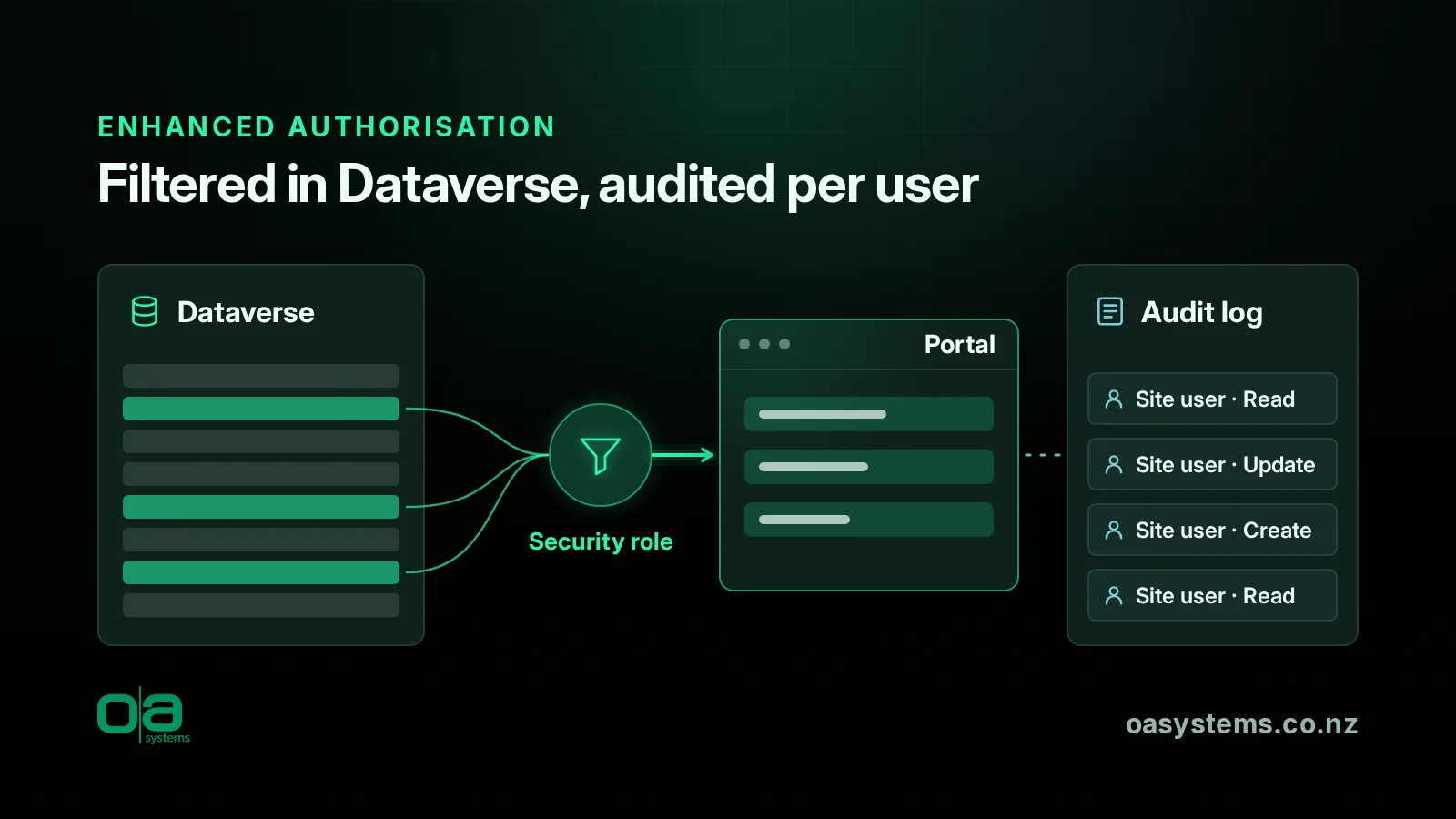
With enhanced authorisation turned on, Dataverse works out permissions from the site user's roles and returns only the records that user is allowed to see. To make that work:
- Each site user (contact) is mapped to a Dataverse system user. A contact who uses more than one site can have more than one system user. These system users are managed internally, don't give direct access to Dataverse and, according to Microsoft, don't need extra licensing. Power Pages licensing still applies.
- Each web role is mapped to a Dataverse security role, and the table and column permissions in your web roles are reflected in those security roles.
- Operations run as the site user through impersonation, rather than as the application user.
- Auditing improves. Where auditing is on for a table, actions from the portal are recorded against the individual site user.
The roadmap item adds that no migration is needed. Existing contact and web role records sync automatically, and makers don't need to change their configuration.
The details that matter in practice
"No migration required" doesn't mean "nothing to check". Three points in Microsoft's documentation are worth a closer look.
1. Plug-ins now run as the site user
Microsoft notes that if any plug-in is registered, it runs as the calling user unless it's explicitly configured otherwise. A lot of portal solutions have plug-ins and custom APIs written on the assumption that portal requests come in under the privileged application user. That was a perfectly reasonable assumption when the code was written. Under enhanced authorisation, those plug-ins may hit permission errors, or behave differently, when they run as a low-privilege site user. Review any server-side logic that portal actions trigger. This is where experience with Dataverse development, including C# plug-ins, really counts.
2. Column-level permissions move to Dataverse column security
Column-level permissions set up in Power Pages for the Web API are bypassed, and Dataverse column security profiles are used instead. If your portal relies on Power Pages column permissions to hide sensitive fields, such as dates of birth, financial details or internal notes, make sure matching column security profiles exist before you turn it on.
3. Check your solution versions
Microsoft lists minimum versions: Power Pages Core 1.1.2605.258 or later and Dataverse Base Portal 9.3.2605.265 or later. Older environments will need updating first.
A sensible test plan
- Use a non-production copy. Given the preview status, test in a sandbox with realistic data and roles.
- Enable it per site. In the Power Pages admin center, edit the site details and select Enable Enhanced Authorization.
- Test as real portal users. Sign in with test accounts for each web role. Confirm they see exactly what they should, no more and no less, across lists, forms and Web API calls.
- Exercise every server-side process. Registration, profile updates, submissions and anything that triggers plug-ins or flows.
- Check the audit trail. Confirm that actions show up against the right site users and that the audit volume is manageable.
- Watch performance. Microsoft expects fewer round trips, so compare response times before and after.
For member portals like the one in our Surf Life Saving New Zealand case study, or multi-audience setups like the Civtec customer and contractor portals, better per-user auditing is a real step forward for privacy and accountability. It's worth taking the time to get it right.
The bottom line
I think moving portal authorisation into Dataverse is a good change. You get one security model, better auditing and possibly better performance. But custom plug-ins and column permissions are exactly where real portal solutions drift away from the documentation examples, so test before general availability arrives, not after.
Talk to OA
If you'd like help reviewing your portal's plug-ins, roles and column security before enhanced authorisation reaches general availability, get in touch about our Power Pages development and consulting services. And if you want to keep an eye on portal health once it's live, have a look at OAsys Sentinel.
Frequently asked questions
Do we have to migrate our Power Pages web roles?
Microsoft's roadmap item says no migration is required. Existing contact and web role records sync automatically with system user and security role tables, and makers don't need to change their configuration. Enhanced authorisation is currently switched on per site in the Power Pages admin center.
Will each portal user need a Dataverse licence?
According to Microsoft's documentation, the system users created for site users are managed internally, don't provide direct access to Dataverse and don't need extra licensing. Access is still governed by Power Pages licensing. Each site user (contact) is mapped to a system user, and a contact who uses more than one site can have more than one.
Is enhanced authorisation ready for production?
Not yet. Microsoft lists it as a preview feature and says preview features aren't meant for production use. The roadmap shows general availability planned for November 2026. In the meantime, test it in a sandbox with realistic data and roles, so you're ready before general availability arrives rather than scrambling afterwards.
What could break when we turn it on?
Microsoft notes that plug-ins run as the calling site user unless configured otherwise, and that Power Pages column-level permissions for the Web API are bypassed in favour of Dataverse column security profiles. Custom server-side logic and field-level security are the main things to test.