
Microsoft is changing how businesses can access and use their Dynamics 365 data through AI. With Business Applications in Work IQ being enabled by default, organisations have an opportunity to make their CRM more valuable. But there are important considerations around security, data quality and readiness.
For years, businesses have invested in Dynamics 365 to manage customer relationships, sales opportunities, service cases and internal processes. Yet accessing that information often means opening CRM, navigating screens, applying filters and finding the right records.
Microsoft's Business Applications in Work IQ aims to change that. It connects Dynamics 365 and Power Apps data with AI experiences such as Microsoft 365 Copilot, Copilot Chat, Copilot Cowork and compatible AI agents.
Instead of navigating through CRM to find information, users can increasingly ask for what they need in natural language.
That sounds like a relatively small change, but we believe it represents an important shift in how businesses will interact with their systems.
And Microsoft's rollout is already underway.
Preview flag: Business Applications in Work IQ remains a preview feature as at 3 November 2026. Microsoft's documentation is marked as prerelease and subject to change. Organisations should validate suitability before relying on these capabilities for critical business processes.
What's changing, and when
According to Microsoft's Work IQ default settings documentation:
- From 30 September 2026, the capability is enabled by default for eligible new production environments.
- From November 2026, Microsoft begins enabling it by default for existing eligible production environments.
The default rollout applies to public-cloud production environments. Trial, sandbox and developer environments are exceptions, along with EU/EFTA and certain government environments.
For many New Zealand organisations, this means their live Dynamics 365 environment falls within the rollout scope, while their test environments may not have the capability enabled automatically.
Microsoft provides administrative controls at three levels:
- Tenant level (Microsoft 365 admin center): Administrators can determine whether Work IQ is available to all users, specific groups or no users. The documented default is All users.
- Environment level (Power Platform admin center): Administrators can enable or disable Work IQ for individual environments.
- Application level (Power Apps maker portal): Model-driven applications have settings that determine their participation in Microsoft 365 Copilot experiences.
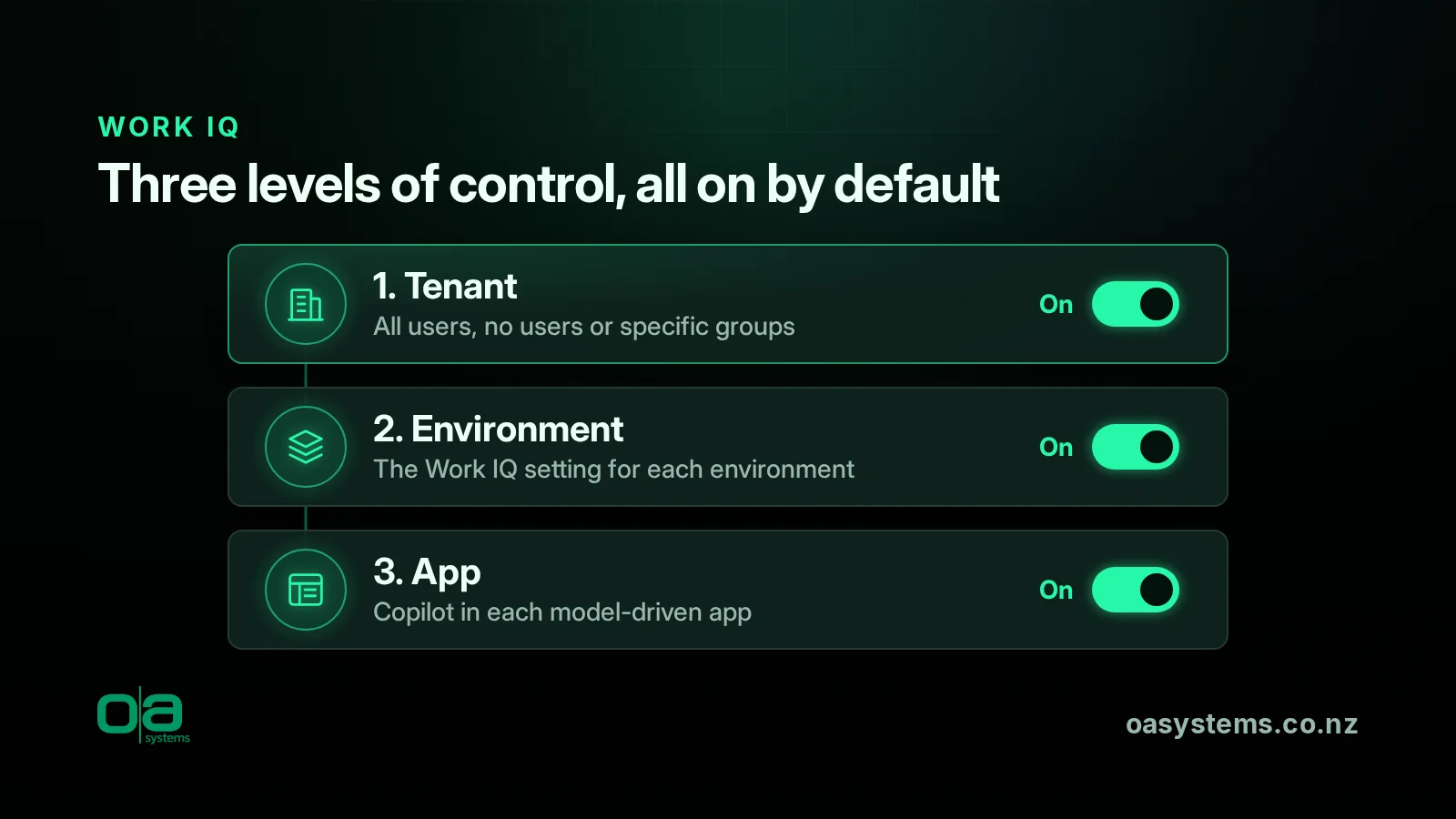
These controls allow organisations to manage adoption rather than simply accepting the default configuration.
However, the important question isn't just whether Work IQ is enabled. It's whether your CRM is ready for the new ways users will interact with its data.
What could Work IQ mean for your business?
The immediate opportunity is straightforward: making information stored in Dynamics 365 more accessible without requiring users to navigate the CRM application.
Consider a few practical examples.
Sales teams: Less searching, more selling
Imagine an account manager preparing for a customer meeting.
Rather than opening Dynamics 365 and navigating multiple records, they could ask Copilot to find open opportunities for that customer, identify overdue follow-ups or retrieve relevant account information.
This could reduce the administrative effort involved in meeting preparation and help salespeople spend more time engaging with customers.
Customer service: Faster access to customer context
A customer service representative receives an enquiry from an existing customer.
Instead of manually searching through account and case records, they could use natural language to locate relevant cases, review their details and identify outstanding activities.
The benefit isn't necessarily replacing Dynamics 365. It's making existing customer information easier to access when it's needed.
Business management: Better visibility into operations
Managers frequently need answers to straightforward operational questions.
Which opportunities require attention? What customer cases remain unresolved? Which activities are overdue?
Work IQ introduces opportunities to retrieve relevant CRM records conversationally, reducing the need to navigate multiple screens and views.
These are illustrative scenarios based on Microsoft's documented capabilities. Actual functionality depends on the available features, user permissions, application configuration and preview limitations.
Businesses have spent years collecting information in CRM. AI is creating new ways to make that information useful.
Why CRM security matters more than ever
One of the most important considerations is how easily users can discover information.
Microsoft states that Work IQ and related Dataverse capabilities respect existing security permissions. Enabling Work IQ does not automatically grant users unrestricted access to CRM records.
That is reassuring, but it also places greater importance on getting those permissions right.
In mature Dynamics 365 environments, security roles often evolve over time. Users change responsibilities, teams grow, and access permissions are sometimes expanded to resolve immediate operational issues.
The result can be users having access to more information than they genuinely require.
Traditionally, that information might have been difficult to find without knowing where to look in CRM.
Conversational AI can make information that users are already authorised to access significantly easier to discover.
As Microsoft's Dataverse MCP server guidance explains, access remains governed by existing user permissions.
Organisations should pay particular attention to sensitive customer information, financial records, confidential notes and attachments, and any permissions that may have accumulated over time.
The objective isn't to restrict access unnecessarily. It's to ensure employees can access the information appropriate to their responsibilities.
Your CRM data quality is now an AI consideration
Security isn't the only consideration.
The quality of information stored in Dynamics 365 will influence the usefulness of AI-driven experiences.
Consider a CRM environment containing:
- Duplicate customer accounts with conflicting information.
- Sales opportunities that haven't been updated for months.
- Inconsistent customer classifications and incomplete records.
- Activities that remain open despite being completed.
- Important business information captured only in unstructured notes.
These issues already affect reporting, automation and operational efficiency.
Making the same information accessible through AI doesn't resolve those underlying problems. In fact, it can make them more visible.
For organisations considering broader AI adoption, this reinforces something we've advocated for years: good business processes and well-maintained data are fundamental to getting value from technology.
AI readiness isn't simply about enabling new features. It's also about ensuring the underlying business systems are fit for purpose.
What about customised Dynamics 365 environments?
Many organisations use Dynamics 365 applications that have been extensively customised to support their business processes.
These customisations might include form JavaScript, custom controls, automated validations, plugins or integrations with other systems.
Not all of these experiences are supported through Work IQ.
Microsoft currently documents limitations affecting certain record creation and update scenarios involving form JavaScript, as well as custom controls and subgrids.
This means users should not assume every task performed within Dynamics 365 can immediately be completed through Copilot.
Organisations with customised applications should identify which processes are supported, test their behaviour and ensure existing business rules remain effective.
For OA Systems clients, this is particularly relevant where CRM has been designed to enforce operational processes rather than simply store customer records.
The goal should be to introduce AI without compromising the processes and controls that make the system valuable.
What should businesses do now?
With Microsoft's rollout beginning for existing production environments in November 2026, we recommend taking a structured approach to Work IQ readiness.
1. Understand your current configuration. Confirm which Dynamics 365 environments are eligible for the rollout and whether Work IQ has been enabled. Review the available tenant, environment and application settings, and decide whether a controlled pilot is appropriate.
2. Review security and sensitive information. Assess Dataverse security roles, team access and column-level security. Pay particular attention to confidential information and permissions that may no longer reflect employees' responsibilities. Our Dataverse development and data modelling services can help organisations review these foundations.
3. Identify practical AI opportunities. Rather than enabling features without a clear purpose, consider where conversational access to CRM information could improve business operations. Start with common activities that consume time, such as customer meeting preparation, case reviews or finding outstanding work.
4. Assess data quality and application design. Review duplicate records, inconsistent data and outdated business processes. For customised applications, validate which Work IQ capabilities are supported and how they interact with existing configuration and automation.
5. Consider licensing and costs. Different Work IQ experiences can have different licensing and consumption requirements, including potential Copilot Credit charges. Microsoft also documents additional Dataverse storage requirements for certain search and semantic indexing capabilities.
6. Review compliance and governance. Consider how existing data protection, compliance and information management obligations apply when CRM data is accessed through Copilot. Compliance attestations for an underlying service do not necessarily extend automatically to every connected AI experience.
7. Validate changes across environments. If your organisation manages Dynamics 365 through solutions and deployment pipelines, review how model-driven app Copilot settings behave during deployment. Microsoft documents that solution imports can carry these settings into target environments.
Microsoft's Business Applications in Work IQ overview provides further information about the capability and its current requirements.
The bigger opportunity: Making CRM the foundation for business AI
Work IQ is another indication of where business applications are heading.
Historically, organisations have focused on making their CRM systems easier to use through better forms, views, dashboards and automation.
Those improvements remain important.
But increasingly, businesses will also need to consider how their information and processes can be accessed through AI-powered experiences.
A well-designed CRM environment becomes more than a place to manage customer relationships. It becomes a structured source of business information that AI tools can use to support employees.
This creates opportunities to rethink how information moves through an organisation, how employees interact with systems and where repetitive administrative work can be reduced.
It also reinforces the importance of having a longer-term approach to CRM optimisation and AI adoption.
Rather than treating AI as a separate technology initiative, organisations should consider how it fits into their existing business applications and operational roadmap.
The bottom line
I think Work IQ represents a sensible direction for Dynamics 365 and the Power Platform.
Making customer information and business processes more accessible through AI has the potential to improve productivity and help organisations get more value from systems they've already invested in.
But the technology itself is only part of the equation.
If your CRM contains inconsistent data, overly generous security permissions or processes that no longer reflect how your organisation operates, enabling AI won't solve those problems.
It may simply make them more apparent.
The businesses that get the most value from AI won't necessarily be those that adopt it first. They'll be those that have prepared their systems, data and processes to use it effectively.
For that reason, we see Work IQ as an opportunity to revisit your broader Dynamics 365 optimisation and continuous improvement strategy, not simply another Microsoft feature to enable.
Talk to OA Systems
At OA Systems, we help organisations get more value from Dynamics 365 and the Power Platform by aligning technology with day-to-day business operations.
Our approach goes beyond implementing features. We work with clients to understand their processes, identify opportunities for improvement and develop practical roadmaps for ongoing optimisation.
As Microsoft introduces new AI capabilities such as Work IQ, we can help organisations review CRM security and data quality, assess AI readiness, identify practical use cases and plan improvements that deliver measurable business value.
The opportunity isn't simply to turn on AI. It's to ensure your business systems are ready to make effective use of it.
If you're considering how Work IQ, Copilot or other AI capabilities could benefit your organisation, talk to OA Systems about AI adoption and Copilot enablement.
Existing customers can also contact us through our Dynamics 365 managed support services.
Frequently asked questions
Will Work IQ be turned on in our Dynamics 365 environment automatically?
Microsoft's documented rollout enables Business Applications in Work IQ by default for eligible new production environments from 30 September 2026, with existing eligible production environments beginning rollout in November 2026.
Certain environment types and regions are excluded from the default rollout.
Does Work IQ allow users to access confidential CRM information?
Work IQ respects existing Dataverse security permissions. However, it may make information that users already have permission to access easier to discover.
Organisations should review their existing security roles and access arrangements before broader adoption.
Can we turn Work IQ off or limit who uses it?
Yes. Microsoft documents tenant-level, environment-level and model-driven app controls. Administrators can use these settings to manage availability and adoption.
Does Work IQ require additional licensing?
Licensing and consumption requirements depend on the specific experience being used. Some scenarios may involve Copilot Credits or additional charges.
Organisations should review Microsoft's current licensing guidance before implementing Work IQ broadly.
Is Business Applications in Work IQ generally available?
No. As at 3 November 2026, Microsoft identifies Business Applications in Work IQ as a preview capability.
Its features, limitations and administration settings may change before general availability.
Does Work IQ use more Dataverse storage?
Microsoft says certain Work IQ capabilities use additional storage for search indexes, including semantic modelling and access to Power Apps and Dynamics 365 data through Microsoft 365 Copilot Chat.
Organisations should review available Dataverse storage capacity as part of their readiness assessment.
This article reflects Microsoft's published documentation as at 3 November 2026. As Business Applications in Work IQ is in preview, organisations should consult Microsoft's latest documentation when making configuration, licensing or deployment decisions.