

Think about how much of a working day goes on getting around the CRM. Open the account, flick between tabs, check the latest activities, find the right opportunity, update a field, add a follow-up task. None of it is hard. Added up, though, it takes a surprising amount of time.
We've spent years making that easier, with simpler forms, better views, dashboards and automation. But I've started to wonder whether the next big improvement isn't a better screen at all. It might be not having to open the screen in the first place.
Asking instead of clicking
Picture a sales manager on a Monday morning. Today they open Dynamics 365, filter their opportunities and open a handful of records to work out what's going on.
Now picture them asking: "Which opportunities have gone quiet in the last two weeks, and which should we follow up?" They get a short summary with links to the records and a reason for each one. Then they ask for a follow-up task for each account owner, check what's proposed, and approve it.
The CRM hasn't gone anywhere. The customers, opportunities, activities and business rules are all still there. What's changed is how the person gets to them.
Some of this is already here
This isn't entirely hypothetical. Copilot in Dynamics 365 Sales can summarise leads, opportunities and accounts, help prepare for meetings and answer questions about sales records in plain language. Microsoft says the Sales agent in Microsoft 365 Copilot will become the preferred way to get that help. According to the Copilot in Dynamics 365 Sales FAQ, it works in Outlook and Teams as well as Dynamics 365 Sales, and supports updating records. Creating records using the Sales agent has been in preview since April 2026.
That's the part I find most interesting. For years, using the CRM meant opening the CRM. Now some of it can come to the apps people already have open.
The archived 2026 release wave 1 plan for Dynamics 365 Sales also lists finding, filtering and sorting with natural language in the smart grid, and a form fill assist toolbar for data entry. Release waves have since been retired, so for what's coming next, Microsoft points to the AI at Work roadmap.
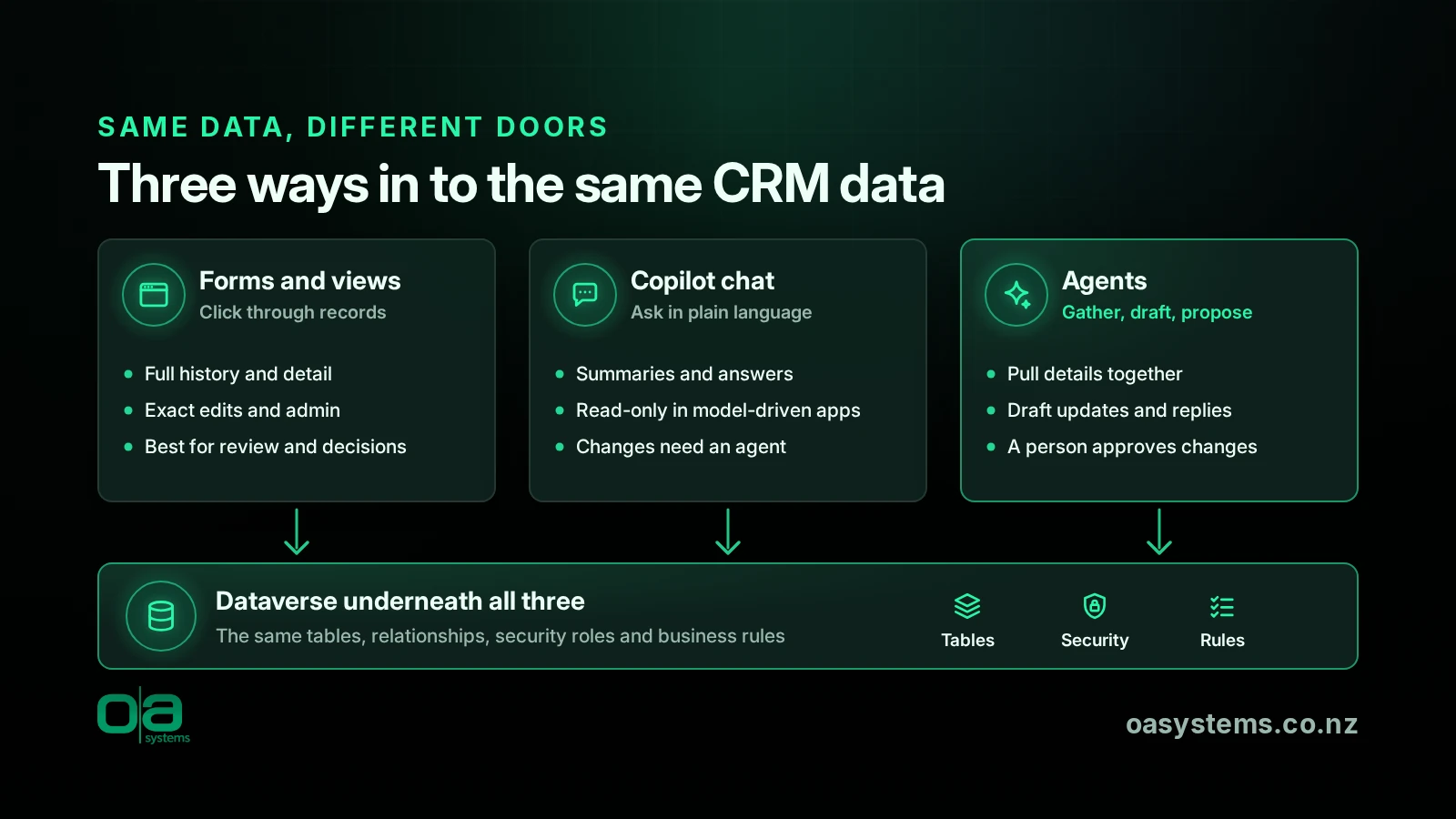
Microsoft Copilot in model-driven apps is read-only: users can view data that matches their queries but can't make changes unless it's customised with an agent. What you get also varies with licensing, configuration and permissions, so don't assume a demo matches your environment.
Where screens still win
So are forms and dashboards on the way out? I don't think so.
A chart still shows a messy pipeline faster than any paragraph. A service rep with an unusual complaint needs to see the whole history, not a summary of it. An admin setting up security roles or business rules needs exact controls. And sometimes it's quicker to change three fields on a form than to explain the change to an assistant.
Then there's trust. If an agent suggests changing an opportunity value or closing a case, the person responsible needs to see what's proposed and why. A good screen does that well.
My guess is that screens become more specialised. Fewer of them for routine lookups and data entry, more of them for reviewing, handling exceptions and making decisions.
The interface isn't the hard part
Here's the bit that's easy to miss. An agent is only as useful as the data and actions it can reliably reach.
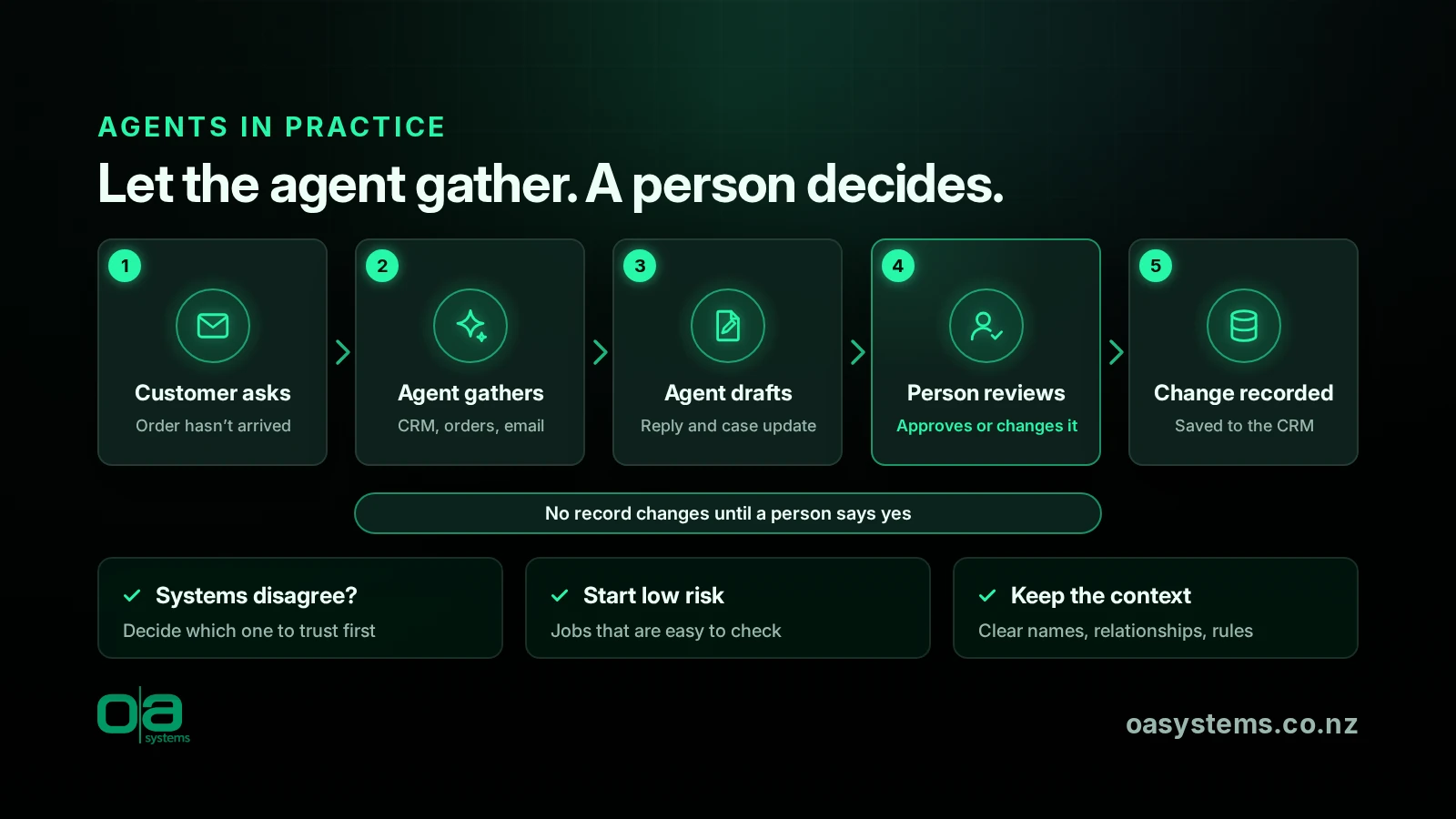
Take a customer ringing about an order that hasn't arrived. An agent could pull the order status, spot the delay, check past emails and draft a reply for the rep to review. Great, until the CRM and the order system disagree. Which one does it trust? What happens if it acts on stale data, and who owns the result?
None of this is new. It's the usual data quality, integration, security and process work. AI just makes it harder to ignore.
On a screen, the labels, sections and process bars give people context. An agent needs that context some other way: clear table and column names, sensible relationships and rules that are actually written down. A poorly designed CRM won't get better because you've added an agent to it. If anything, the design matters more.
What I'd do now
You don't need to rebuild anything. Start by looking at where people spend time hunting for information or repeating the same steps. Those are good places to test whether a conversational approach helps.
Then look at the basics. Are customer records reliable? Do the integrations actually work? Are your business rules and permissions right? These are worth fixing whatever happens with AI.
When you do try agents, start with jobs that are easy to check and low risk if they go wrong. Finding information and drafting suggested changes is a sensible start. Letting an agent change records across several systems with no review is a very different thing.
So, will we still need CRM screens?
Yes, I think we will. I just suspect we'll spend a lot less time clicking around them. The CRM becomes less of a place you go and more of a service that turns up where you're working. If that means fewer tabs and less searching, I'm all for it.
References
- Copilot in Dynamics 365 Sales overview (Microsoft Learn)
- FAQ about Copilot in Dynamics 365 Sales (Microsoft Learn)
- Add Microsoft Copilot for app users in model-driven apps (Microsoft Learn)
- New and planned features for Dynamics 365 Sales, 2026 release wave 1 (archived) (Microsoft Learn)
- Dynamics 365, Power Platform and Dataverse join the AI at Work roadmap (Microsoft Dynamics 365 blog)
Talk to OA
If you'd like to work out where Copilot or an agent could save your team time, and whether your CRM data is ready for it, have a look at our AI adoption and Copilot enablement service or our Dataverse development work. Or just talk to OA.
Frequently asked questions
Will AI replace Dynamics 365?
I don't think so. AI is more likely to change how people get to their CRM data than replace the platform. The customer records, business rules, security and integrations still need to live somewhere. What may shrink is the time spent clicking through screens for routine lookups and data entry.
Can Copilot update CRM records?
Some of it can. The Sales agent in Microsoft 365 Copilot supports updating records, and creating records with it has been in preview since April 2026. Microsoft Copilot in model-driven apps is read-only unless it's customised with an agent. What you get varies with licensing, configuration and permissions.
Will CRM forms and dashboards disappear?
Probably not. Charts still show a pipeline faster than text, complex cases need the full history, and admins need exact controls. Sometimes editing three fields is quicker than explaining it. I expect screens to become more focused on reviewing, handling exceptions and making decisions, with fewer used for routine navigation.
Why does data quality matter more with AI agents?
An agent is only as useful as the data and actions it can reliably reach. If records are duplicated, activities aren't logged or two systems disagree, the agent can act on the wrong information. On a screen, people often notice the problem. With an agent, it can be harder to spot.
Where should we start with AI in our CRM?
Look for places where people spend time hunting for information or repeating steps, and check that your records, integrations, rules and permissions are sound. Then try agents on jobs that are easy to check and low risk, such as finding information and drafting suggested changes for a person to approve.